



Time and attendance system
An employee attendance system that collects working hours by itself: from a card swipe at the door or from a phone. The attendance log and the timesheet fill in against each person's work schedule, with nothing typed by hand.
Working hours by card or from a phone, a timesheet and the shift roster in one system.
 At work
Record working hours by card or from a phone
A working day starts in one of two ways and both land in the same record. No paper log, and no separate attendance terminal.
-
An employee opens their own page in the phone's browser and starts and ends the working day with one tap. There is no app to download, and the page can be added to the home screen.
-
Where a door is on an S4A controller and its reader is set as an entry or an exit, a swipe with a card linked to the employee opens the door and records the start or the end of the working day. The employee does nothing extra.
-
People who do not come to the office clock in from a phone or a computer. Per employee you can require that clocking in works from one device only, or only from the office network.
At work
Work schedules and the shift roster
To count lateness and overtime, the system has to know when you expect each person. The work schedule says so.
-
Fixed hours for the office, a daily norm for flexible work, and, where your plan includes shift planning, a rotation for people on shifts. Each schedule states its break and how many minutes late still counts as on time.
-
You place shifts on people in a weekly grid and set a repeating rotation once. An employee asks for a shift swap from their phone and you approve it in one list. Shift planning depends on the plan.
-
You load the national holidays into the calendar in one step and add the company's own days yourself. A holiday is never counted as an absence, and hours worked on one are shown separately.
Overtime pay calculator A free shift roster template in Excel
The timesheet and overtime hours
Keeping the timesheet is no longer a job for the end of the month: every day is already graded against the schedule, so you review it and export it.
-
For each employee you see planned and worked hours, late arrivals, early departures and the days with a missing clock record. Leave and holidays are not counted as absence.
-
Overtime is what goes beyond the day's plan. Night, holiday and rest-day hours are counted separately, because payroll treats them differently.
-
The timesheet exports as a CSV file on every plan, within the plan's monthly allowance; the Excel, PDF and XML formats depend on the plan. The working time recording form an employer in Georgia has to keep is filled in from the same data.
The working time recording form: the rule, how to fill it in and the Excel form
The attendance log: who came in and who was late
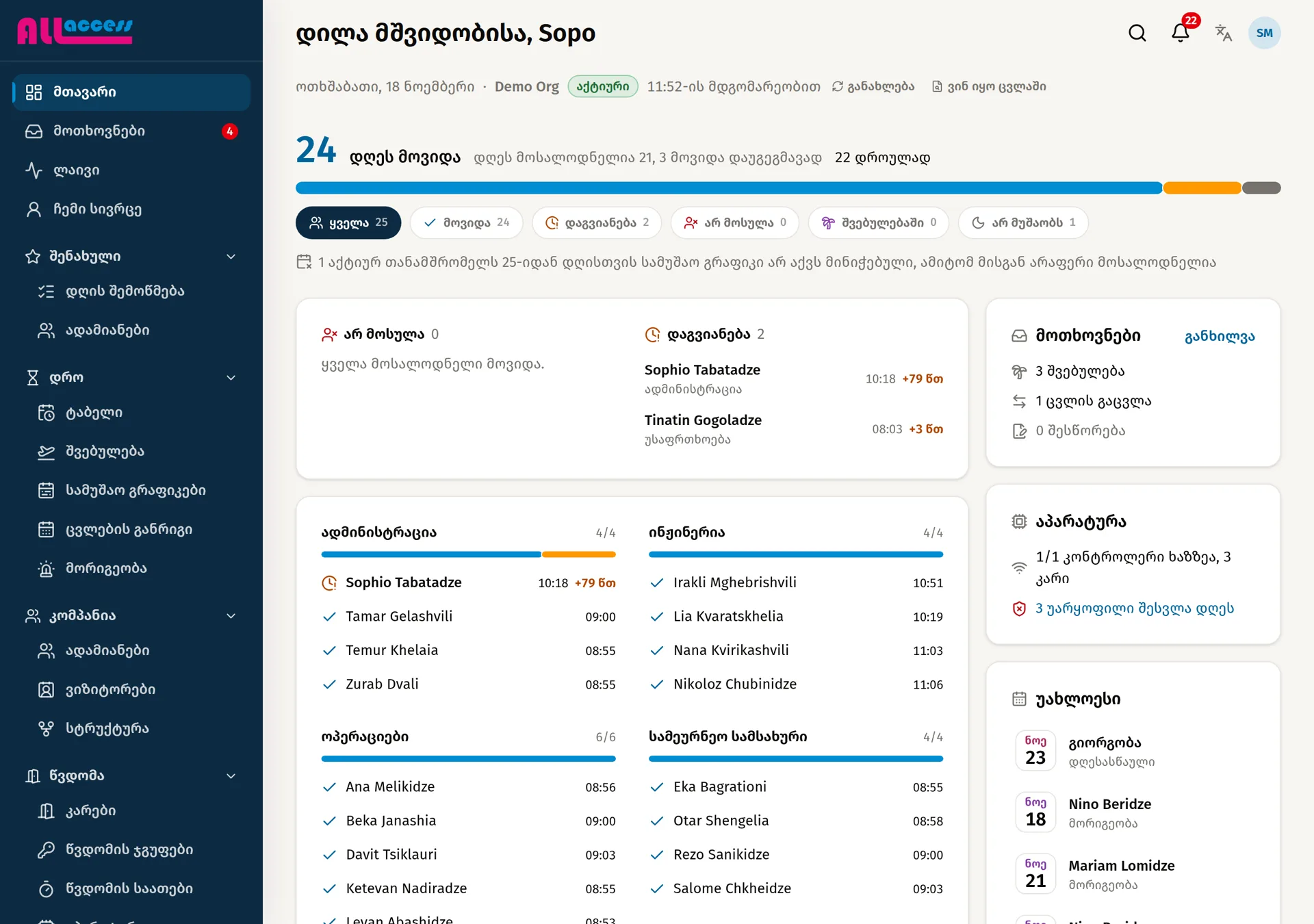
An attendance system does more than collect numbers. Every morning it shows you who is at work and which day needs your attention.
-
Who has arrived, who is late, who is on leave and who is still expected, by department. The question of where somebody is gets answered without a phone call.
-
An employee who forgot to clock in asks for a correction from their phone, and a manager approves or rejects it. Who changed what stays in the audit log.
-
Who was late this week? The assistant answers from your own records. It can also prepare a change, and nothing happens until you confirm it. It is a separate add-on.
 Ask
2 people were late today.
The other 22 arrived on time.
How time and attendance works
Four steps from the first employee to the first timesheet. You need hardware only if you want people to clock in by card.
-
Add your employees
Enter them by hand or load them from a file, and invite them to their own page.
-
Set the work schedule
Choose fixed hours, a flexible norm or, where your plan includes them, shifts, and assign it to the people it applies to.
-
They clock in
One tap on a phone, or a card swipe at the door. The board shows you who is at work.
-
Export the timesheet
At the end of the month review the graded days, decide the corrections and export the timesheet.
Questions about time and attendance
-
No. Employees start and end the working day from their phone, so you can begin with no hardware at all. If you want attendance recorded by a card swipe at the door, you need a door controller: today ALL access works with S4A controllers, and controllers from other makers are coming soon.
-
They clock in from a phone or a computer, like everybody else. If you need more control, you can bind each employee to one device, or make clocking in possible from a named network only. The system does not read the phone's location.
-
Every day is graded against the employee's work schedule. What goes beyond the day's plan is overtime, and a short day does not cancel out a long one, because payroll treats them differently. Night, holiday and rest-day hours are shown separately.
-
A CSV file on every plan, within the plan's monthly allowance, while the Excel, PDF and XML formats depend on the plan. The working time recording form an employer has to keep is filled in from the same data and is available on every plan. On the paid plans the period totals can also be read through the API, for a payroll program.
-
The timesheet shows that day as one with a missing clock record. The employee asks for a correction from their own page, and a manager approves or rejects it. Both the correction and the decision are written to the audit log.
One system, one record
Access, attendance and leave rest on the same people and the same events, so you never enter anything twice.
Access control
Card entry, access groups and schedules, and remote door opening.
Leave management
A request from a phone, approval in one list, and a balance that counts itself.
AI and integrations
The AI assistant in the console, an MCP connector that only reads, and the REST API in the paid plans.
Put every door under one system.
Start free with mobile check-in today, or book a call and we will plan your doors with you.